Remote Control for Rоku & TCL
- 4.1
- Rating
- 1.00M
- Installs
- Free
- Price
 Analysis by App-foxy
I tried Remote Control for Roku & TCL as the kind of utility you open when the physical remote has disappeared under a sofa cushion, stopped responding, or simply is not worth passing around the room. It is a free Android tools app from SensusTech LLC, built around controlling compatible Roku, TCL, Hisense, and Insignia smart televisions, with screen mirroring included in the same package. That combination makes it more useful than a basic button replacement, although it also means the quality of the experience depends heavily on how your television and phone are connected.
My first impression was practical rather than exciting: this is an app meant to solve an annoying household problem quickly. The important question is not whether it has a long feature list, but whether it can find the television, send commands reliably, and make typing or navigation less irritating than using the tiny physical remote. In my experience, it is most appealing for people who regularly use streaming apps, share a TV with family members, or want a second control method always available on a phone.
How the app feels in its current state
The current release is version 1.8.3, and the app has reached more than 1 million installs. Its average score is 4.3 from around 50 thousand ratings, with roughly 4.8 thousand written reviews. Those figures suggest a well-established utility rather than an experimental remote, but they should not be read as a guarantee that every television setup will behave identically. Remote apps are unusually sensitive to network arrangement, TV model, and whether the phone is connected to the same local network.
You May Also Like

 Blood Strike: 2.5 Anniversary
Blood Strike’s Loadouts Turn Every Drop Into a Tactical Gamble
A close look at Blood Strike’s custom loadouts: how fast access to signature weapons reshapes its battle royale rhythm, rewards preparation, and narrows the gap between fights.

 Pandora - Music & Podcasts
Pandora’s Music Is Easy to Start, but Harder to Recover
Pandora’s strength is its low-effort path from a seed to a station. Its weak spot is how much confidence it asks you to place in connection, setup, and quiet recovery.

 8 Ball Pool
 Is Built on Rivalries, Rematches, and Routine
A close look at the rivalries, rematches, shared routines, and unanswered safety questions that turn a quick pool match into a persistent mobile community.

 Samsung Music
’s Quiet Strength Is Playing What You Already Own
Its reach comes less from spectacle than from dependable access to a personal library. That simplicity is both the app’s strongest retention engine and its ceiling.

 AccuWeather: Weather Radar
AccuWeather Review: A Quick, Clear Forecast for Everyday Decisions
For everyday plans, the best forecast is the one you can understand quickly. AccuWeather makes rain timing, radar, and local conditions easy to act on, with a few trade-offs.

 Hill Climb Racing
Why Hill Climb Racing Still Turns Crashes Into One More Run
A tiny car, a bumpy hill and one more upgrade: Hill Climb Racing keeps resurfacing because its simple chaos makes every near-miss feel personal.
More From Our News Desk



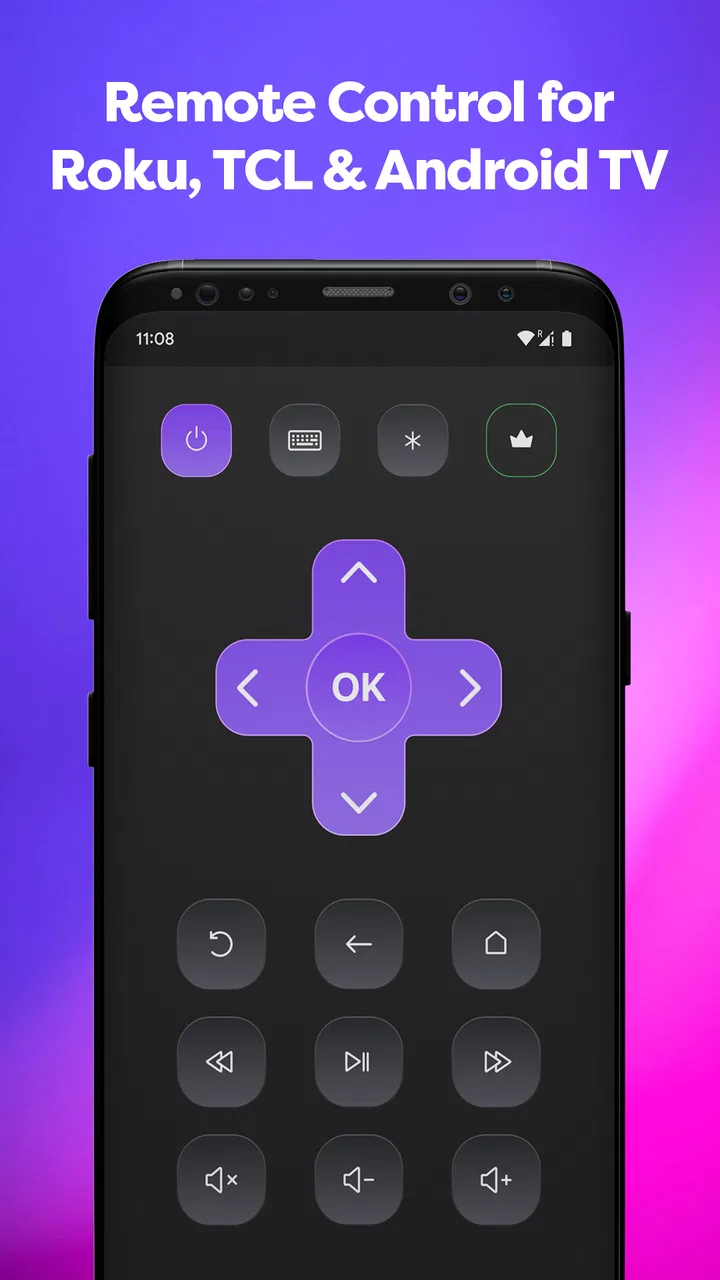
The basic appeal is immediate. Instead of searching for a lost remote, I can reach for my phone, open the app, and use an on-screen control layout for common television actions. That is especially convenient when I am already holding the phone while browsing what to watch. The phone also gives me a familiar keyboard for searches, which can be less tedious than moving through letters one at a time with directional buttons.
The app belongs in the tools category because it is not trying to replace a streaming service or turn the phone into a media library. Its job is control. That focus is a strength: I do not need to learn a complicated dashboard before using the essential functions. At the same time, users expecting a universal remote for every television brand should adjust their expectations. The intended range is specific, centered on Roku and selected smart-TV families rather than every device in the living room.
Compatibility is the first thing I would check before relying on it. The store summary names Roku, TCL, Hisense, and Insignia smart TVs, so the app makes sense when one of those brands and platforms is involved. If your television is from another manufacturer, or if you want to control a set-top box, soundbar, game console, or air conditioner from the same screen, a broader universal-remote app may be a better direction. This app is more focused, and that focus is useful only when it matches the equipment you own.
What everyday control is actually like
For routine navigation, a phone remote has a few quiet advantages over the original handset. The phone is usually easier to locate, its screen can be brighter, and the controls do not depend on small physical buttons that have become worn. I also find the touchscreen approach helpful for occasional users who never remember which button opens the home screen or returns to the previous menu.
A realistic example is a shared television in a family room. One person is watching a show while another wants to lower the volume, pause playback, or move through a menu. Having the app on a second phone avoids hunting for the remote or interrupting the person who is holding it. It can also be handy in a guest room or holiday rental where the physical controller is missing but the TV is still connected and ready to use.
There is a trade-off, though. A physical remote provides tactile feedback, so I can operate it without looking down. A touchscreen cannot do that as well. If I am watching a film in a dark room, finding the right on-screen control may be slower than feeling for a familiar button. People who strongly prefer physical controls may use this app as an emergency backup rather than as a permanent replacement.
The useful difference between navigation and typing
The strongest reason to keep a phone remote installed is not necessarily changing channels or adjusting volume. It is text entry. Searching for a film, entering an account detail, or naming a device can be unpleasant with a standard television keyboard. A phone-based workflow can make those moments feel less like a chore, especially for households that search frequently rather than selecting from a short list of recommendations.
I would still treat typing as a convenience rather than a promise that every input field will behave perfectly. Television interfaces differ, and the result depends on how the app communicates with the connected set. If a search screen does not accept text as expected, the navigation controls remain the fallback, but that can remove much of the advantage over the original remote.
Another practical tip is to open the app before guests arrive or before starting a long viewing session. That gives me time to confirm that the TV appears and that the essential controls respond. It is better to discover a connection issue while nobody is waiting for the movie than after the physical remote has already gone missing.
Screen mirroring: helpful, but not the same as casting
Screen mirroring broadens the app beyond remote buttons. It can be useful when I want to show something from my phone on the television, such as photos, a webpage, or content that is easier to open on the handset. This is a different workflow from simply sending a video through a dedicated casting feature. Mirroring reproduces the phone’s screen, so the phone remains part of the experience and may need to stay active while the content is displayed.
That distinction matters for expectations. Mirroring is convenient for occasional sharing, but it is not automatically the best method for watching a long film or playing a demanding mobile game. A dedicated TV app, native casting option, or wired connection may be smoother for extended playback. I would use the mirroring function for quick demonstrations, family photos, or a page that has no suitable television app, rather than assuming it replaces every other way to put content on a larger screen.
Before mirroring, I would make sure the phone and television are on the same local network and avoid testing it for the first time during an important presentation. Network congestion can affect responsiveness, and a phone notification can become visible while the screen is being shared. That is not a criticism unique to this app; it is simply part of the practical cost of mirroring a personal device.
What the release history tells me, and what it does not
The app was released on July 4, 2021, and the current version is 1.8.3. That gives it enough time in the market to develop beyond a first prototype, while the version number shows that the product has continued through multiple revisions. I see that as a positive sign for a utility that has to deal with changing television software and a variety of home-network conditions.
Still, a version number alone does not tell me exactly which controls, connection behaviors, or mirroring improvements changed in each update. I would not treat it as evidence that every possible television issue has been solved. The sensible conclusion is narrower: the app is an actively maintained product with an established release path, and users should keep it updated when a newer version becomes available through their platform.
For someone who installed an earlier release, the practical effect of moving to version 1.8.3 is likely to be best judged by behavior rather than by assumptions. Does the television reconnect more easily? Do the buttons respond consistently? Does mirroring start without repeated attempts? Those are the changes that matter in a remote app. I would test the functions I actually use instead of judging an update only by its number.
Existing users should also remember that an update can change the feel of an interface even when the main purpose remains the same. If the layout or connection flow looks different after updating, taking a moment to locate the home, back, volume, and navigation controls can prevent accidental taps. Keeping the app current is sensible, but I would avoid uninstalling a working backup remote until I know the new release behaves properly with my TV.
Where the app saves time
The best workflow is to treat the app as a ready secondary remote, not as something to configure from scratch every evening. Once the television is recognized, I can leave the app available on the phone I normally keep near the sofa. That reduces the friction of opening it when the physical controller is missing. It is also useful for people who move between rooms and do not want to carry a separate remote everywhere.
Families may find another advantage in having several people able to control the same compatible TV from their own phones. That can reduce arguments over who is holding the remote, but it also means more than one person may be able to pause or change what is playing. I would establish a simple household rule about who controls the screen during a film or presentation. The app makes access easier, and easier access can occasionally create its own small social problem.
For older relatives or occasional users, I would set up the app and demonstrate only the controls they need. A phone screen can be less intimidating than a remote covered with unlabeled buttons, but it can also be confusing if too many gestures or options are introduced at once. A simple explanation—open the app, choose the TV, use the directional pad and volume controls—usually works better than presenting every capability immediately.
Where the usual alternatives still win
The original Roku or television remote remains the better choice when tactile buttons, instant wake-up, and independence from a phone are priorities. It does not require me to unlock a handset, launch an app, or worry about another notification appearing while I am watching. If the physical remote is reliable and always nearby, this app may add convenience rather than replace anything essential.
The official remote solution for a specific television platform can also be preferable when I want the closest possible integration with that platform. A general third-party tool may be more attractive when I own several supported brands or want a single interface, but I would compare connection reliability and the exact functions I use most. The right choice is not the one with the longest description; it is the one that consistently controls my particular TV.
A hardware universal remote is stronger for a living room containing several devices. It can bring the television, receiver, and other equipment under one physical controller, which this app is not designed to do as a complete home-theater replacement. On the other hand, hardware costs money and can be misplaced, while this app is free to install. The free entry point is a meaningful advantage for someone who only needs television control and screen mirroring.
Costs, age suitability, and the small print of convenience
The app is free, with in-app purchases priced at $4.99 per item. That means I can evaluate the basic experience before deciding whether any optional purchase is worthwhile. I would look carefully at what a purchase unlocks inside the app and whether I actually need it, especially if the free remote already handles my television and the mirroring tools I use.
It carries an Everyone content rating, which fits its household utility purpose. Parents should still remember that the app controls access to a television rather than filtering what appears on streaming services. The age label describes the app itself, not the suitability of every program a child might open through the connected TV.
The minimum operating-system requirement is Android 6.0. That makes the app accessible on a wide range of Android phones, including older devices that may not run newer utilities. However, an older phone can still affect the experience through slower app loading, weaker Wi-Fi hardware, or a less responsive touchscreen. If the app feels delayed, I would test the same TV from a newer phone before concluding that the television connection is at fault.
The remaining gaps I would consider before installing
The biggest gap is the dependence on a compatible networked television. A phone remote cannot help much if the TV is offline, asleep in a way that blocks network control, or connected to a different network segment from the phone. Public Wi-Fi, guest networks, range extenders, and router isolation can all complicate discovery. In a home with strict network separation, the app may be less convenient than a physical remote even though both devices are in the same room.
Another limitation is the loss of tactile certainty. I can swipe or tap the wrong place, and I may need to look at the phone while navigating. This is manageable for casual use but less ideal when I want to control the TV without taking my eyes away from the screen. Heavy users who adjust volume constantly or navigate menus by feel may prefer hardware.
Screen mirroring also brings phone-specific compromises. The phone is occupied while its display is shared, and incoming interruptions can distract from the presentation. For a quick family photo, that is acceptable. For a work demonstration or a long viewing session, I would choose a method designed for uninterrupted output whenever possible.
I would skip this app if my television is outside the supported Roku, TCL, Hisense, or Insignia smart-TV range, if I need one controller for a full home-theater system, or if I refuse to depend on a phone for basic operation. I would also avoid making it my only remote until I have confirmed that it reconnects reliably in my own home. A backup plan is sensible for any network-based remote.
What I would watch in future updates
For future releases, I would pay attention to connection recovery after the phone changes networks, the clarity of the pairing process, and how consistently the controls work across the supported television families. Those details matter more than adding decorative features. A remote app earns trust when it opens quickly, identifies the right TV, and responds without repeated tapping.
I would also watch for improvements to the boundary between remote control and mirroring. Clearer guidance about when to use each mode would help new users avoid expecting mirroring to behave like native casting. Better handling of common home-network complications would be equally valuable, because many frustrating setup experiences are caused by the environment rather than by the buttons themselves.
For current users, my advice is simple: keep the app updated, use it on the same local network as the TV, test the main controls before discarding the physical remote, and treat mirroring as a convenient sharing tool rather than a universal replacement for every TV playback method. Those habits make the experience more predictable without pretending that a phone can solve every television problem.
My recommendation after using it
I would recommend this app to someone with a compatible Roku, TCL, Hisense, or Insignia smart TV who wants a free backup remote and occasionally needs to mirror a phone screen. Its strongest everyday benefit is convenience: the remote is likely to be within reach, text entry can be less frustrating, and a second household member can control the TV without searching for a missing handset.
I would not recommend installing it blindly as a replacement for every remote in the house. Compatibility and local-network behavior are central, and the touchscreen experience is not ideal for people who depend on physical buttons. The optional purchases also deserve a quick review before spending anything, since the basic free experience may already cover a light user’s needs.
Overall, I see Remote Control for Roku & TCL as a useful, focused tool rather than a complete home-theater command center. Its established presence, current version 1.8.3, free starting price, and screen-mirroring option give it a practical place on an Android phone. If your television fits its supported family and your Wi-Fi setup is straightforward, it is worth trying as a dependable second remote. If you need multi-device hardware control or absolute offline reliability, the familiar physical remote—or a dedicated universal alternative—will still be the better choice.
FAQs for Remote Control for Rоku & TCL
01What features does the Remote Control for Roku & TCL app offer?
The Remote Control for Roku & TCL app provides users with a full-function remote interface, allowing them to navigate their Roku and TCL TVs seamlessly. Features include volume control, channel navigation, and quick access to streaming apps. Additionally, the app supports voice commands and offers a keyboard for easy text input, enhancing the overall user experience.
02Is the app compatible with all Roku and TCL devices?
Yes, the app is designed to be compatible with most Roku streaming devices and TCL Smart TVs. However, it is important to ensure that your device is on the same Wi-Fi network as your phone or tablet for the app to function properly. Checking for device compatibility on the app’s download page is recommended before installation.
03Does the app require a subscription or any in-app purchases?
The Remote Control for Roku & TCL app typically offers a free version with basic functionality. However, it may also offer in-app purchases or a subscription model to unlock premium features such as ad-free usage, additional remote skins, or enhanced voice command options. It's advisable to review the pricing details within the app.
04How user-friendly is the app for beginners?
The app is designed with a user-friendly interface that caters to both beginners and experienced users. It features intuitive controls and an easy setup process. New users can quickly learn how to navigate the app, thanks to its straightforward design and helpful tutorials or tips that may be available within the app.
05What should I do if the app is not connecting to my device?
If the app is not connecting, first ensure that both your mobile device and Roku or TCL TV are on the same Wi-Fi network. Restarting both devices can often resolve connection issues. Additionally, checking for app updates or reinstalling the app may help. Refer to the app’s support section for further troubleshooting steps.
Pros
- Easy setup with step-by-step guide.
- Seamless connection with minimal lag.
- Customizable remote layout options.
- Supports voice commands effectively.
- Works with multiple Roku devices.
Cons
- Ads can be intrusive at times.
- Limited free features without upgrade.
- Occasional connectivity drops.
- No widget support for quick access.
- Requires Wi-Fi for full functionality.

Remote Control for Rоku & TCL
Gallery